For mobile mechanics, solo techs and small repair shops
Run your whole shop from your phone. Or your computer. Or your tablet.
Customers book you from your own link. You scan the car, write the estimate and send the invoice before you pack up your tools. They pay you directly, and CaliperX never takes a cent of it.
7 days free, then a flat $25 a month. No contract, no fee per booking, cancel any time.
No company name? No problem. You do not need an LLC, a shop front or a business name to use CaliperX. Plenty of people here work for themselves under their own name. Sign up as Mike and your booking link is simply caliperx.app/book/mike — or whatever you already go by. You can change it later, and your old links keep working.
Other software charges over $100 a month for this. CaliperX is $25. Flat.
The amounts below are what other companies charge for each of these tools sold on its own — they are not our prices, and you will never see them on a CaliperX bill. With CaliperX you get all of them for one flat $25 a month, and everything we add later is included at no extra cost.
What you get with CaliperXWhat others charge for it
Online booking and schedulingelsewhere, about $30 a month
Digital inspections with PDF reportselsewhere, about $40 a month
Estimates, invoices and payment recordselsewhere, about $30 a month
VIN scanning and decodingelsewhere, usually a paid add-on
The Turo annual checklistwe haven't found it anywhere else
Separate sign-ins for your techselsewhere, usually charged per person
Bought separately, that's about $100 a month before you even get to the VIN scanner, the Turo checklist or a second sign-in. None of that is what you pay us.
What you actually pay
$25a month, flat — everything above included, no contract, nothing added after the free trial
The right-hand column shows typical 2026 prices other companies charge for comparable tools sold on their own; none of those amounts are CaliperX charges. All-in-one shop platforms start at about $99 a month and run past $400. CaliperX is a flat $25 a month after the 7-day free trial, with no contract.
What makes it different
A few things you won't find in the other apps.
The Turo annual checklist, done on your phone
Turo hosts need a 21-point inspection every year, and almost everyone still fills it in on paper. You do it on your phone, sign it with your finger, and send the host a link to sign from wherever they are. What comes out is a finished PDF they can upload.
A condition score your customer understands
Every inspection ends with one number out of 100 and a letter grade. Instead of reading a wall of red text, your customer sees a score — and you look like the professional you are.
Arrival windows, because traffic is real
You promise a two-hour window, not 9:00 sharp. Customers pick the window that suits them, so nobody is upset when the job before theirs runs long.
Nothing gets priced before you've seen the car
When a customer doesn't have the parts, they don't get a guessed price. They tap “I don't have them — tell me the price first,” and you quote the right part for that exact car.
See it work
Watch it before you sign up for anything.
These are narrated screen recordings of the real product, taken from two live accounts. Nothing here is a slide or a drawing of an app. Customer names, phone numbers, addresses and VINs are blurred because they belong to real records — but every dollar figure is exactly what CaliperX worked out on its own.
Watch for this part
Your customer signs off on the price before you touch the car.
You text them the estimate. They open it on their own phone, read what it costs, and sign it with a finger — there is nothing to download and nothing to pay yet. The signature is saved with the date, the time and a frozen copy of the prices they agreed to, so if anyone ever asks what was approved, the answer is sitting on the job. An invoice can be signed the same way.
If customers come to you
1 min 27 sec · narrated · repair shop
A walk-in is found by typing three letters of their name. The estimate goes to their phone and comes back signed. Then the job card, the receipt, and what the month is actually worth.
If you go to the customer
1 min 15 sec · narrated · mobile mechanic
Call, say you are on the way, or navigate — all from the job itself. Then the same signed estimate, the invoice it becomes, and what you cleared after what you spent getting there.
How customers book you
1 min 41 sec · narrated · the booking link
Where your link and QR code live, what a customer sees when they open it, and how their booking arrives in your app as a job — without anyone typing it twice.
One login, two ways to work
The app in your hand. A full dashboard on your desk. Same account.
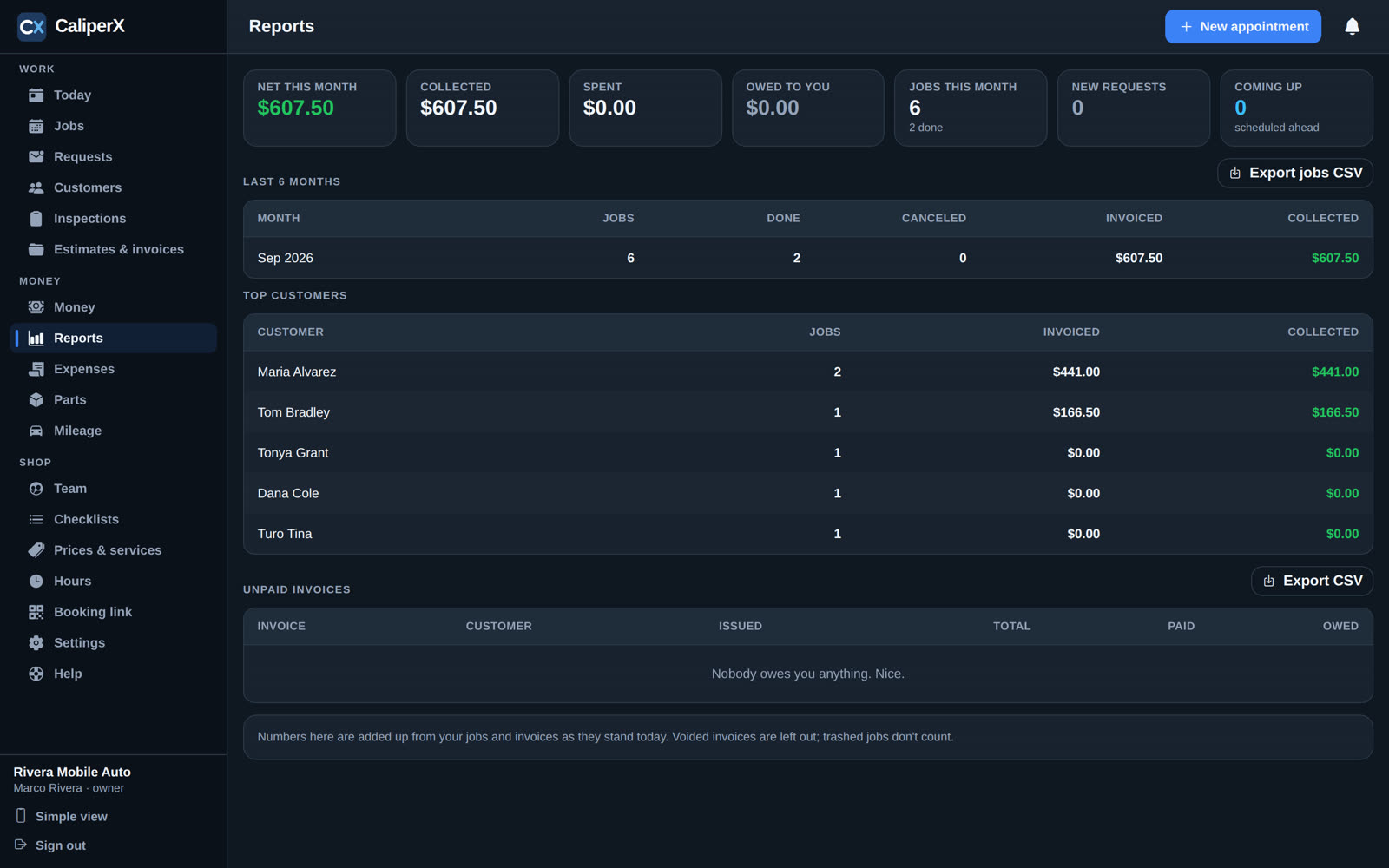
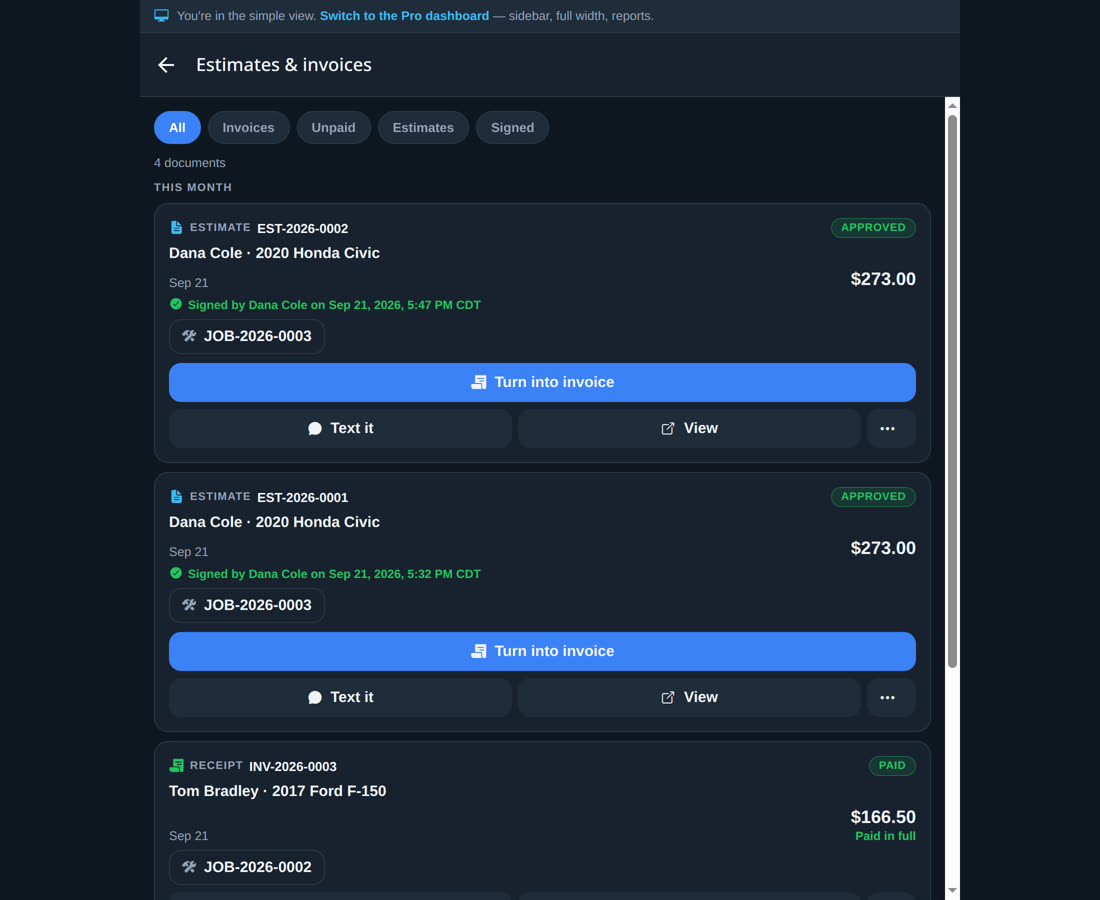
Sign in on your phone and it’s the app: big buttons, one job at a time, built for a hand that’s just been under a car. Sign in at app.caliperx.app on a computer and the same account opens as a dashboard — sidebar, full-width pages, reports as tables you can export. Prefer the phone layout on a big screen? One click switches to the simple view. Nothing to sync; it’s the same data either way.
Pro dashboard
app.caliperx.app on a computer
Everything down the left, the page across the rest, and a Reports page with six months of jobs, who did the work, top customers and what’s still owed.
Simple view
the phone layout, in a browser
The same screens as the app, in a phone-shaped column. Handy on a tablet at the counter, or for anyone who already knows the app by heart.
Switch between them any time from the sidebar or the More tab. Your phone stays the app; the choice only applies to browsers.
Why CaliperX
Built around the way you actually work.
You can't answer the phone from under a car.
So let your booking page answer it instead. Your customer taps your link, picks what they need and chooses a time window. You get a notification, and the request waits in your inbox until you're ready to accept it.
You shouldn't lose a job to paperwork.
Build the estimate from your own price list and text it over. Your customer signs it on their phone, and one tap turns it into an invoice. When they pay you, it becomes their receipt.
Nobody should take a cut of your work.
There is no commission and no booking fee, and your customers' money never passes through us. They pay you however you like — cash, card, Zelle, Cash App, Venmo or a check — and you simply record it.
It is just me, and that is the whole business.
Then this was built for you. There is no company name to invent, no seats to buy and no minimum. Work under your own name, add a tech later if you ever need one, and pay the same $25 either way.
You want to look like a real shop.
Your photo and your first name sit at the top of your booking page. Your estimates and invoices are properly numbered. Your inspection reports come out as clean PDFs on your own letterhead.
What it does
Everything from the first tap on your link to the receipt.
All of it is in the one plan. Nothing is held back for a bigger tier. Everything works whether customers come to you or you go to them; the few things only a mobile mechanic needs are marked (for mobile mechanics).
Inspections with a score
Mark each item Good, Watch or Replace. Finish with a score out of 100.
Walk around the car and tap your way through the checklist. Add a photo to anything you want the customer to see, and note brake and tire measurements as you go. At the end you get one score and a grade, weighted so engine and safety items count for more. The report becomes a PDF on your letterhead that you can text straight over.
VIN scanning
Point your camera at the door jamb and the car fills itself in.
Scan the barcode on the door frame and CaliperX works out the year, make and model. It does that on the phone itself, so it still works in a garage with no signal, then fills in the rest once you're back online. You can always type the VIN in or pick the car by hand.
Your booking page and QR code
Customers book you from a link. There's nothing for them to download.
Share the link in your bio and print the QR code on your business cards. Your page shows your photo, your first name, what you charge for labor and the time windows you have open. Customers can type in their VIN and the car fills itself in. They also get a link to reschedule or cancel on their own, so that call doesn't come to you either.
Arrival windows
Give a time window you can actually keep.
Choose the windows that fit your day — a morning slot, an afternoon slot, whatever works — and how many jobs each one can hold. Customers pick a window, not a minute, so a job that runs long doesn't make you late for the next one. Works the same whether they come to you or you go to them.
Your service area and travel(for mobile mechanics)
Set how far you'll drive. Everyone outside that can't book you.
Set your home ZIP code and your radius, and the booking page turns away anyone outside it before they take a slot. Your travel fee goes on the estimate by itself. On the day, every job has On my way and Navigate buttons, and you can log the miles against the job. Shops customers drive to switch to in-shop mode and none of this appears.
From request to calendar
Accept a request and the job is on your calendar.
New requests arrive with a notification on your phone. Accept one and it becomes a job, with the customer, the car and everything they told you already filled in. Walk-ups and phone calls take a few seconds to add by hand. Every message you send — confirming, on my way, running late — is already written for you, and it goes from your own number so replies come straight back to you.
Photo links your customer can zoom in on
The leak, close up, with your note under it.
Every report you text is a link. On it, each photo you took opens full size, with the note you wrote underneath — the leaking seal, the worn edge of the tire, the crack in the belt — so the customer sees what you saw and understands the price. Links and photos stay up for 99 days; after that the photos are cleared from our servers and your copy of the report lives on as a PDF.
The Turo annual checklist
Turo's 21-point form, filled in and signed on your phone.
Enter your measurements and the form answers the points it can. You sign with your finger, then send the host a link so they can sign from wherever they are — or just hand them your phone. What comes out is a PDF laid out like the paper form, with both signatures on it, ready for the host to upload.
Estimates, invoices and receipts
Send it, they sign it, you get paid.
Pick services from your price list, then add parts, labor, fees or a discount. Tax and your travel fee are worked out for you. Text the estimate and your customer signs it on their phone — the signature is saved with the date and time, and the prices lock so nothing can change afterwards. One tap turns the estimate into an invoice, and once it's paid it becomes their receipt.
Your money, month by month
See what came in, what went out and what you're still owed.
Record each payment as it lands — in full, in part, or split across two methods. Log parts, expenses and mileage against the job they belong to. Your monthly totals then add themselves up, so there's no spreadsheet to rebuild on a Sunday evening.
Sign-ins for your team
Your techs see the work. They don't see the money.
Give each person their own username and password. They can open jobs, customers, cars and paperwork, but your monthly totals and your settings stay private to you. If someone forgets their password, you reset it yourself.
Hand out jobs, see who did what
Assign a job to a tech. It lands on their Today screen.
Anyone on the team can put a job in someone's hands when it's booked, from the job, or after the fact to record who did the work. The person assigned gets a notification and a Mine / Everyone switch on their day. Every job keeps a timeline — who booked it, who was put on it, status changes, photos, estimates, payments and the notes the team leaves each other — and the customer never sees any of it.
A quick receipt for the small stuff
Bill it and mark it paid in one go. No job, nothing to sign.
A ten-minute fix, a price agreed over the phone, work you did last week: pick the customer, type the lines, say how they paid and when the work was done, and you have a receipt to text them — dated to the day, without a job, an estimate or a signature box. Everything else still gets the full treatment when it needs it.
Your paperwork, your way
Five looks. Your logo and colour on every page.
Classic, Elegant, Quick, Pro or Modern — pick one look for estimates, invoices and receipts and another for inspection reports, then put your logo and your colour on them. Add your warranty wording and your own terms, and every document carries them. Preview any of the five with your own letterhead before you choose.
Help that answers at 11pm
Ask how anything works and get an answer in seconds.
The assistant in the app knows every screen and answers “how do I…” questions on the spot, any hour. It knows your own account's plain facts, it never touches your billing, and when something needs a person — money, something broken, anything it isn't sure of — one tap hands the whole conversation to our team, who reply right there in the app.
A real example
This is exactly what your customer opens.
Nothing below is a mock-up. It's the same invoice page CaliperX builds for every job, with your shop's name at the top instead of ours. Your customer opens it from a text, reads it on their phone and can save it as a PDF. Once you record the payment, this same page becomes their receipt.
Made with CaliperX · booking, estimates, inspections and invoices for mechanics · caliperx.app
Sample invoice for a front brake job. Your own shop details, services and prices go in place of these. The customer’s name, number and VIN are blurred here — on a real one they are filled in.
How it works
Four steps, and the paperwork is done when the job is.
1
Sign up here, use it anywhere
Your account is made here on the website — that's where the card and the subscription live. Then sign in with the same email on the free app on your phone, or at app.caliperx.app in a browser on a tablet or computer. Add the services you offer and what you charge, set your area and your time windows, and a short checklist walks you through the rest.
2
Share your link
Put it in your bio, in your texts and on your cards as a QR code. From then on, customers can book you without calling.
3
Do the job and write it up as you go
Scan the VIN, run an inspection if they asked for one, take a few photos and build the estimate right there. Your customer signs on their phone before you start.
4
Send the invoice and get paid
One tap turns the estimate into an invoice. Your customer pays you directly, you record it, and the job closes with everything saved to it. Nothing left to type up tonight.
Straight answer
We're not a middleman, and we never will be.
CaliperX is simply software you use to run your own shop. We don't list you in a directory, we don't rank you against the shop down the road and we don't send you leads. Every booking you get starts with a link you handed out yourself. We're not part of the job and we're not part of the payment — your customer hires you, pays you and deals with you. There is no commission and no booking fee. You pay $25 a month for the tools, and that is the whole arrangement.
One plan. Everything in it.
Everything, for $25 a month.
We're adding more tools all the time. Every shop gets every one of them, for the same flat price.
One plan
$25a month
7 days free — 14 if a shop referred you.
No contract and no tiers: one flat price for every shop, and every tool we add is included. If the price ever changes, it changes for everyone, and we email you at least 30 days before it does.
Referred by another shop? Your trial is 14 days instead of 7 — and once you stay, the shop that sent you earns $20.
Your own booking page, QR code and arrival windows
As many jobs, customers and cars as you like
VIN scanning that works without a signal
Inspections with a 0–100 score and PDF reports on your letterhead
The Turo annual checklist, signed by you and the host
Estimates, invoices and receipts your customers sign by text
Payments, expenses, mileage and your monthly totals
Separate sign-ins for your techs
Notifications when someone books, changes or signs
Every new tool we add, at no extra cost
You sign up and manage your subscription here on the website, and the app comes with it. Cancel any time — you'll keep everything until the end of the period you've paid for.
Questions
The ones people ask before they sign up.
A caliper is the tool that measures exactly, and it's the brake part every mechanic knows by heart. The X is for what comes next.
Do you take a cut of my jobs?+
No, never. Your customers pay you directly and we only keep the record. There is no commission, no booking fee and no card processing in between. The $25 a month is the only thing you ever pay us.
Is it really one price for everything?+
Yes. $25 a month, flat, for every feature and every shop — no tiers, no per-seat charges, no contract. Everything we build later is included. If the price ever changes, it changes for everyone at the same time and we email you at least 30 days before it takes effect; you can cancel any time before then and never pay the new amount. Bought separately, tools like these come to well over $100 a month.
I work for myself and do not have a company name. Can I use it?+
Yes, and a lot of people here do. There is no LLC, shop front or registered business name required. Put your own name in when you sign up and your booking link becomes something like caliperx.app/book/mike. You can change that link whenever you like, and anyone holding an old one still lands in the right place.
Do I need a card to try it?+
Yes. You add your card when you sign up, and the 7 days are free. Nothing is charged until the trial ends, and if you cancel before then you are not charged at all. If another shop referred you, the trial is 14 days.
What happens if I cancel?+
You can cancel any time from the website. You'll keep using everything until the end of the period you've already paid for, and then it stops. No one will call you to talk you out of it.
Is CaliperX an app or a website?+
Both, with one sign-in. You sign up and pay here on the website. Day to day you use the free app on your phone, or open app.caliperx.app in a browser on a tablet or computer — same email, same password, everything in sync. If you found us in the App Store first, this website is where the account gets made; then you sign in on the app.
Do my customers need to download an app?+
No, and that's rather the point. They book from your link in their browser, sign estimates from a text, and open invoices and reports as normal web pages or PDFs. The app is for you, not for them.
Will you send me customers?+
No, and we'd rather be straight with you about that. CaliperX isn't a directory or a marketplace, and we don't vet or recommend mechanics. Nobody finds you through us — every booking starts with a link you gave someone.
Will texts go out from a number my customers don't recognize?+
No, because we don't send texts at all. We write the message for you and you send it from your own phone, so your customer sees your number and their reply comes back to you.
Can I use it on an iPad or a tablet?+
Yes, and the browser is the best way to do it. Open app.caliperx.app on the tablet and sign in — everything works, with nothing to install and nothing to keep updated. The phone app is built for a phone in your hand; on a tablet the browser gives you the same thing with more room.
I have a shop, not a van. Does this still work?+
Yes. Switch to in-shop mode and your customers come to you, so there's no travel fee and no service radius. Everything else works exactly the same.
What can my techs see?+
Jobs, customers, cars and paperwork — everything they need to do the work. They can't see your monthly totals or change your settings, and you can reset their password whenever they need it.
Try it on your next job.
Set your page up this evening and send the link to your next customer. See how it feels to finish the paperwork before you’ve packed up your tools. The first 7 days are free, and if you cancel before then you are not charged.